[Network] Add/Delete Static Route in Windows Routing Table & TraceRoute an IP
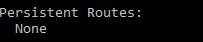
Adding Static Route in Routing Table Syntax of adding static route to routing table in cmd: route add -p destination_IP MASK subnet_mask gateway_ip metric_cost(optional) If you don't have a specific subnet_mask, then use 255.255.255.255. metric_cost is a cost relative to other costs in the routing table. Windows decides which route to take based on the metric_cost. Remember to trace route the destination_IP (explained later) after adding a static route to confirm the static route is working (that it does indeed go through your gateway_IP to reach your destination_IP). Removing Static Route in Routing Table Syntax of removing static route to routing table in cmd: route delete destination_IP Print Route To print your routing table, run this in cmd: route print For example, before you added any static route, in your 'route print' you will see none under persistent routes: After you are done adding a static route, it'll look like this: ...