Posts

Showing posts with the label Network

[Network] Will we run out of IP addresses?

So before we answer the question - Will we run out of IP addresses? - I will first explain the two main types of IPs out there; IPv4 and IPv6. But if you can't wait, the short answer is no; but the long answer is depends on how you define IP. What are Internet Protocols (IP) addresses? In short, they are an unique number that gets linked to all online activity you do; like a return address on a letter you'd send out. an IP address to your internet device. Your internet activity goes through them, and they route it back to you; using your IP address. IP addresses are assigned to your computer by Internet Service Provider (ISP; like AT&T, Comcast.etc). It's their role to assign Note that IP addresses are not permanent. Even if you are at home, simply turning your modem or router on and off, or contacting your ISP will change your IP. IPv4 and IPv6 The Internet Protocol version 4 (IPv4) is a protocol for use on packet-switched Link Layer networks (e.g. Ethern...

[Terminal] Finding port availability and killing process using it

Image
To find out if there are any processes using a particular port, you should run the following command line: lsof -n -i4TCP:<PORT NUMBER> which will give you the following: Then, enter the following cl to kill the process: kill -9 <PID> More Info lsof: means list open files lists file information about files opened by particular process(es)ers to host names for network files.  -n option makes the command faster by preventing it from doing an IP to hostname conversion. -i[internet address] option selects the listing of files whose internet address matches the internet address.  Internet address format:  [4 or 6][protocol][@hostname | hostaddr][:service | port] The 4 or 6 refers to IPv4 and IPv6 Resources: https://stackoverflow.com/questions/3855127/find-and-kill-process-locking-port-3000-on-mac

[Front End] Client-side rendering vs Server-side rendering

Do you ever wonder - what can a website not do? You can chat, play games, work on Google Doc.etc.  Server-Side Rendering Traditional way of rendering a website. How it works? Server generates HTML files and sends it to browser (client), where it is displayed as a website. Doesn't matter if new page has one difference than the current page, the browser will ask for the entire page, and re-render everything. Client-Side Rendering Didn't become popular until JavaScript libraries started using this development style; examples are Vue.js and React.js How it works? Instead of getting the generated HTML files from the server, you download the data you need, template HTML(s) and Javascript (libraries). Then, the browser renders the data into the template HTML using Javascript or Javascript Libraries. Server is responsible for less processing (doesn't need to generate the HTML) - this responsibility is pushed to the client (browser). When navigating through ...

[Network] Add/Delete Static Route in Windows Routing Table & TraceRoute an IP

Image
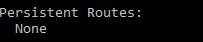
Adding Static Route in Routing Table Syntax of adding static route to routing table in cmd: route add -p destination_IP MASK subnet_mask   gateway_ip   metric_cost(optional) If you don't have a specific subnet_mask, then use 255.255.255.255. metric_cost is a cost relative to other costs in the routing table. Windows decides which route to take based on the metric_cost. Remember to trace route the destination_IP (explained later) after adding a static route to confirm the static route is working (that it does indeed go through your gateway_IP to reach your destination_IP). Removing Static Route in Routing Table Syntax of removing static route to routing table in cmd: route delete destination_IP Print Route To print your routing table, run this in cmd: route print For example, before you added any static route, in your 'route print' you will see none under persistent routes:  After you are done adding a static route, it'll look like this: ...

[Network] Static and Dynamic Routing

Routing Routing is the mechanism that informs the network the procedures to get to different IP networks. Routing is done via devices, known as routers. What's a Routing Table? According to howtogeek.com, "A routing routing table dictates where all packets go when they leave a system - whether that system is a physical router or a PC." Dynamic Route Most routers (including the one in your PC) use some form of dynamic routing, which means the router has the capability to figure out the best place to forward packets based on information from other routers. To see this in action, use the traceroute command to see the connections a packet makes as it reaches its destination. Use Case The use case of dynamic routing would be - imagine you have 100 routers, and you want to add 2 new different subnets. In this case, you will have to add 200 (2 x 100) static routing entries. Pros of using Dynamic Route Removes the likely of human error due to the repetitive n...

[Web Architecture] Reverse Proxy vs Load Balancing

According to nginx.com, the definition of Reverse Proxy and Load Balancer are: A  reverse proxy  accepts a request from a client, forwards it to a server that can fulfill it, and returns the server’s response to the client. A  load balancer  distributes incoming client requests among a group of servers, in each case returning the response from the selected server to the appropriate client At this point, it almost seems as if they are the same thing. Let's dive deeper to see the difference. Load Balancing Sometimes, the volume of requests generated from your website may be too much for one server to handle. In that case, you will use  multiple servers. But even then, you will need something to distribute the requests to each server; evenly. This 'something' is the load balancer .  They basically solve network traffic problems. Session Persistence A cool thing that I also read about is session persistence . Will need more researching for this.....